Quote-to-cash in one seamless journey.

Bringing heightened visibility, control and accelerated momentum to the contract automation process.

Closing the Loop: POs, Stock and Procurement

Company
Worldover (B2B)
Clients
Amelia Knight, Hera Beauty, Elevation Labs +3 more
My Role
Solo Product Designer
Team
Engineers, Customer Success/UXR, Regulatory
Timeline
June 2025 - Ongoing
Tools
Figma, FigJam
My Contribution
Responsible for all design outputs.
As the solo designer at Worldover, I drove the entire design process — from synthesising client pain points with our customer success and research teams to collaborating daily with engineers to bring ideas to life through rapid prototyping and iteration.

The Background
A fast-moving and highly coordinated environment.
The cosmetics manufacturing industry runs on precision and coordination. Our clients — contract manufacturers and raw material providers — juggle hundreds of formulations and products across multiple regions, where every decision impacts timelines, inventory, and profitability.
Their business success depends not only on efficient R&D but on the upstream and downstream processes that make development possible — maintaining stable stock levels, managing customer-facing quotes, purchase orders, and invoices, and fulfilling outgoing orders on time for contract production.
At Worldover, we’re building the infrastructure to unify these systems — enabling teams to work faster, smarter, and with complete visibility from concept to delivery.

The Problem
Using multiple systems slows momentum.
Current processes in managing stock and procurement emerged as a key challenge for our clients (identified by our customer success/UXR team).
All 10 clients we spoke with reported relying on multiple tools to track and manage stock, making workflows difficult to maintain and train teams on how to use.
The Solution (a sneak peak)
Concept. Procurement. Execution. One Platform.
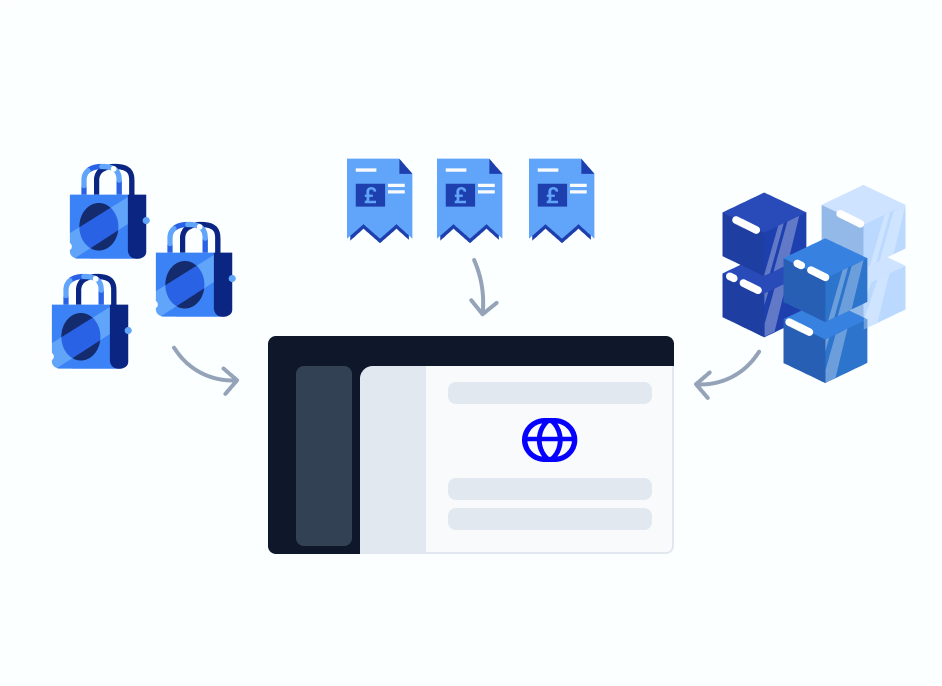
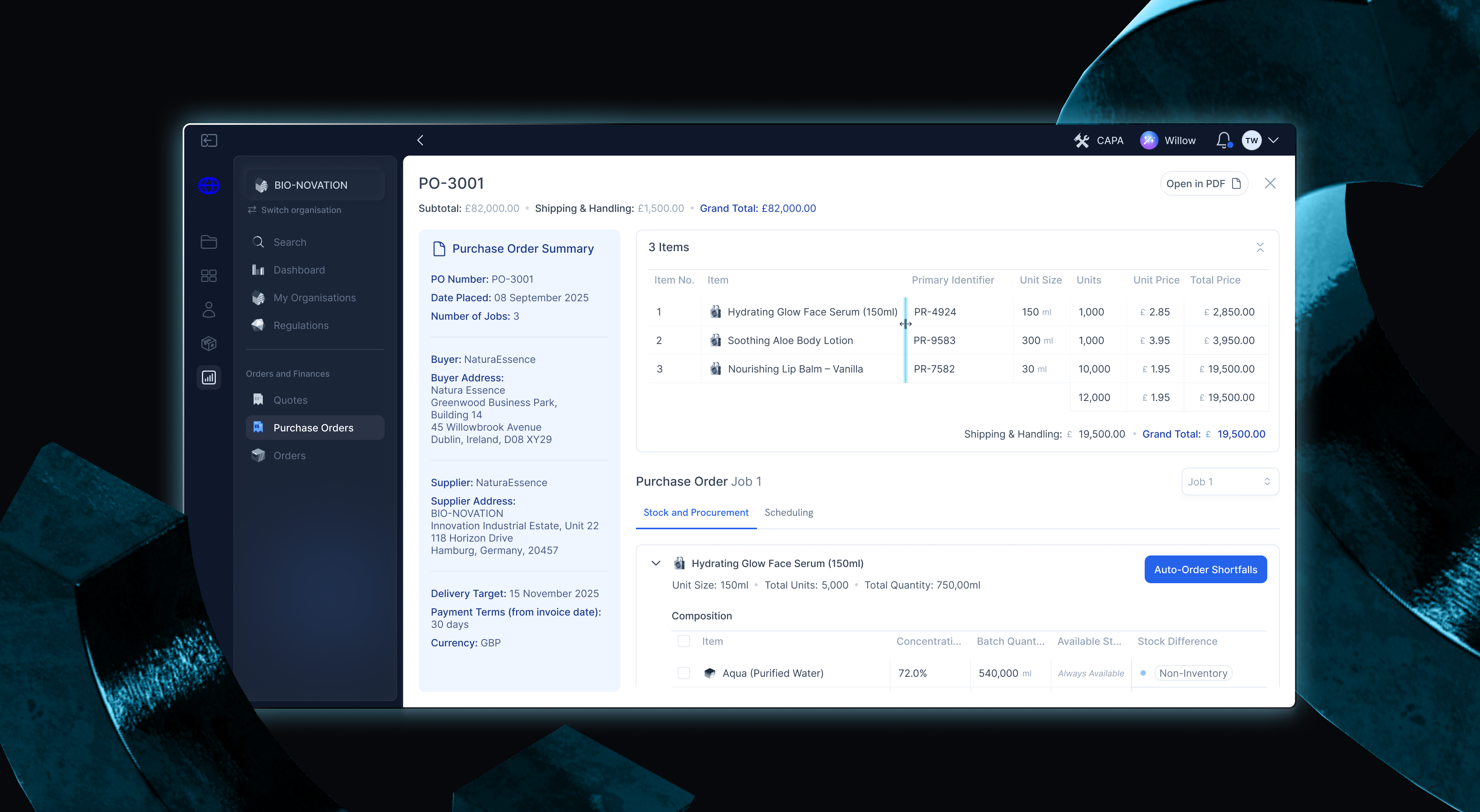
Our new quoting, PO, stock, and procurement features close the loop for our clients — connecting everything from R&D to invoicing in one seamless platform.
With their product portfolios already set up in Worldover, teams can now manage the entire quote-to-cash process without switching tools — faster, clearer, and more connected than ever.
Business Opportunity
A jigsaw piece business opportunity.
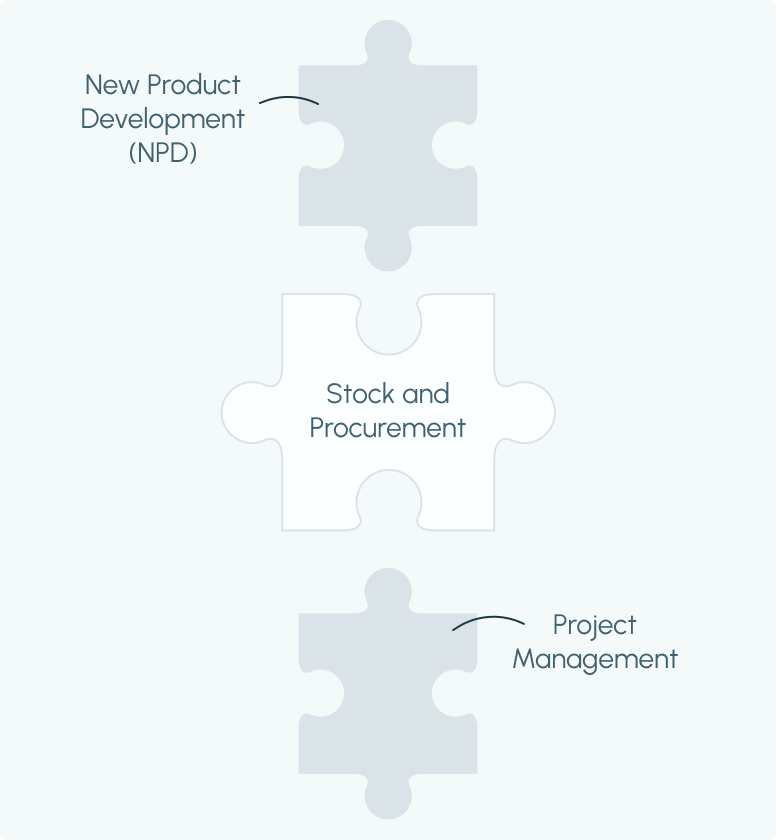
Worldover’s vision has grown from enabling new product development in cosmetics to powering the full end-to-end management of product portfolios.
Our platform already covers NPD and project management, but our user's needs presented an opportunity that snugly fit into the business' long-term goals. Stock and procurement was already in the pipeline for future development, but I pitched fast-tracking stock and procurement as our next priority, driven by the clear and immediate demand from our clients for an easier and more connected resource planning process.
With our CTO’s approval, I moved into design.
Design Process
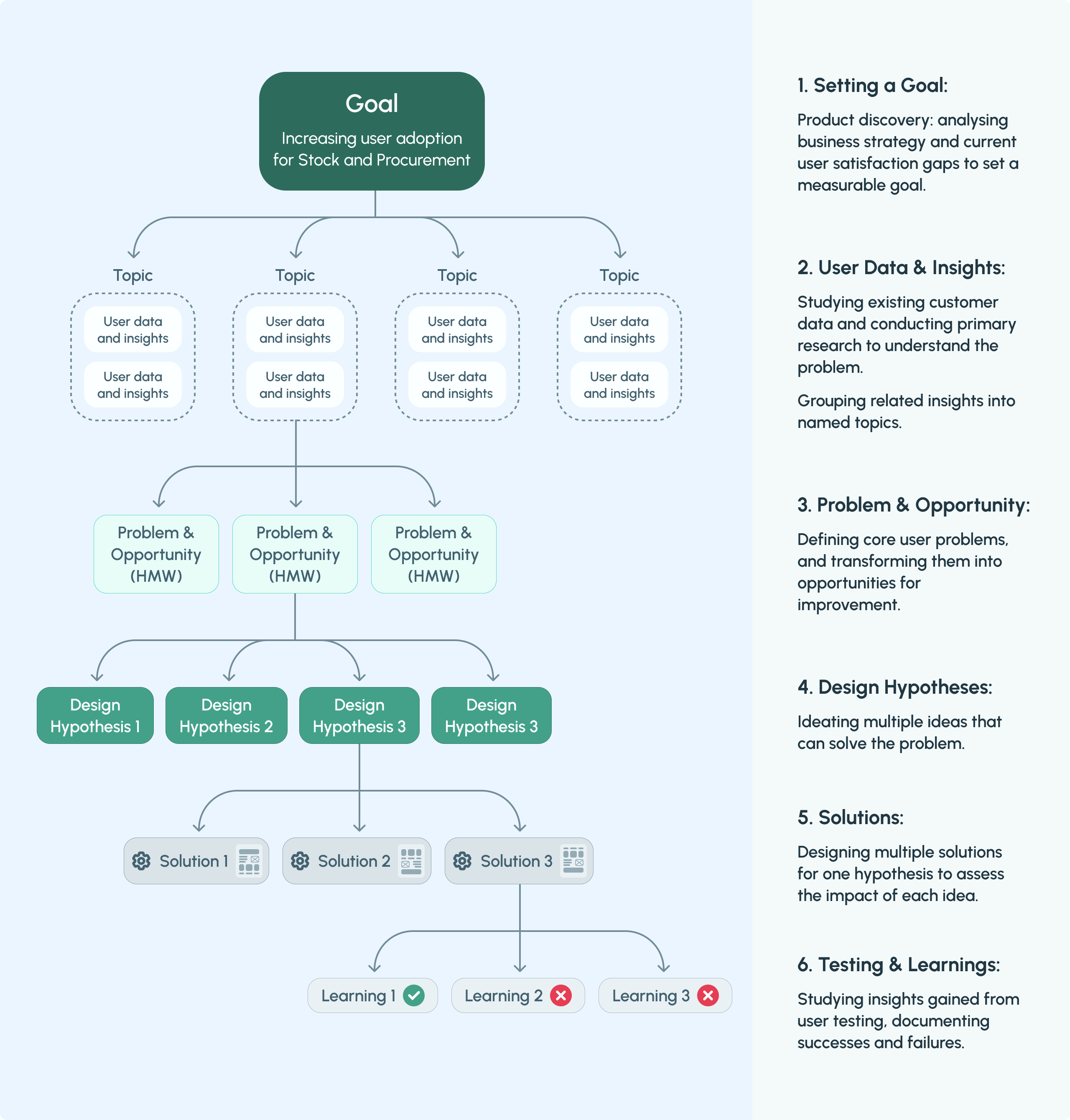
The Thoughtful Execution Tree.
After identifying the problem, I created a thoughtful execution tree centred by a high-level goal to lay the product framework of how our teams (UXR, design (me), engineers, regulatory affairs) can ideate solutions grounded on the user data and insights that we found.
User Data & Insights
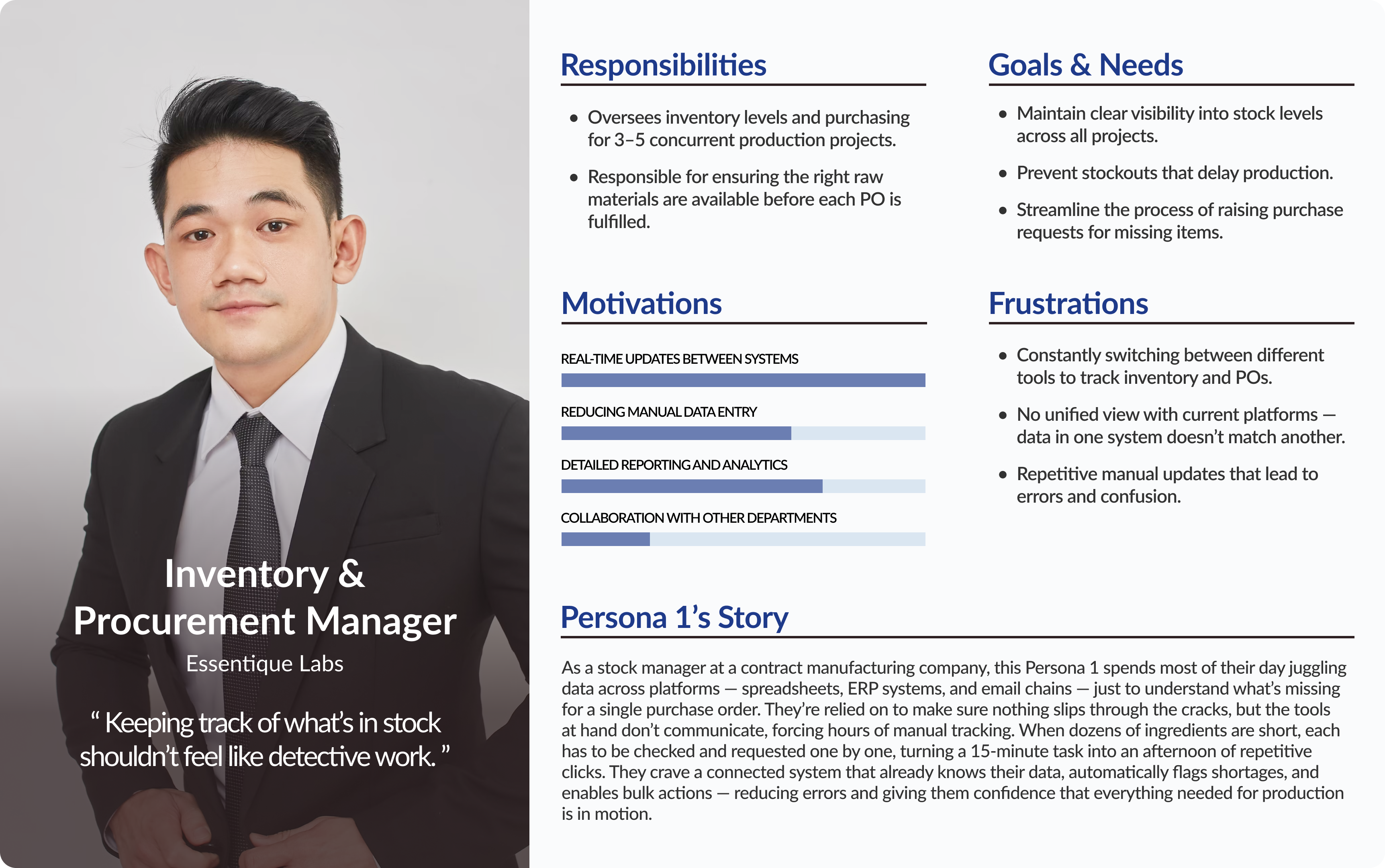
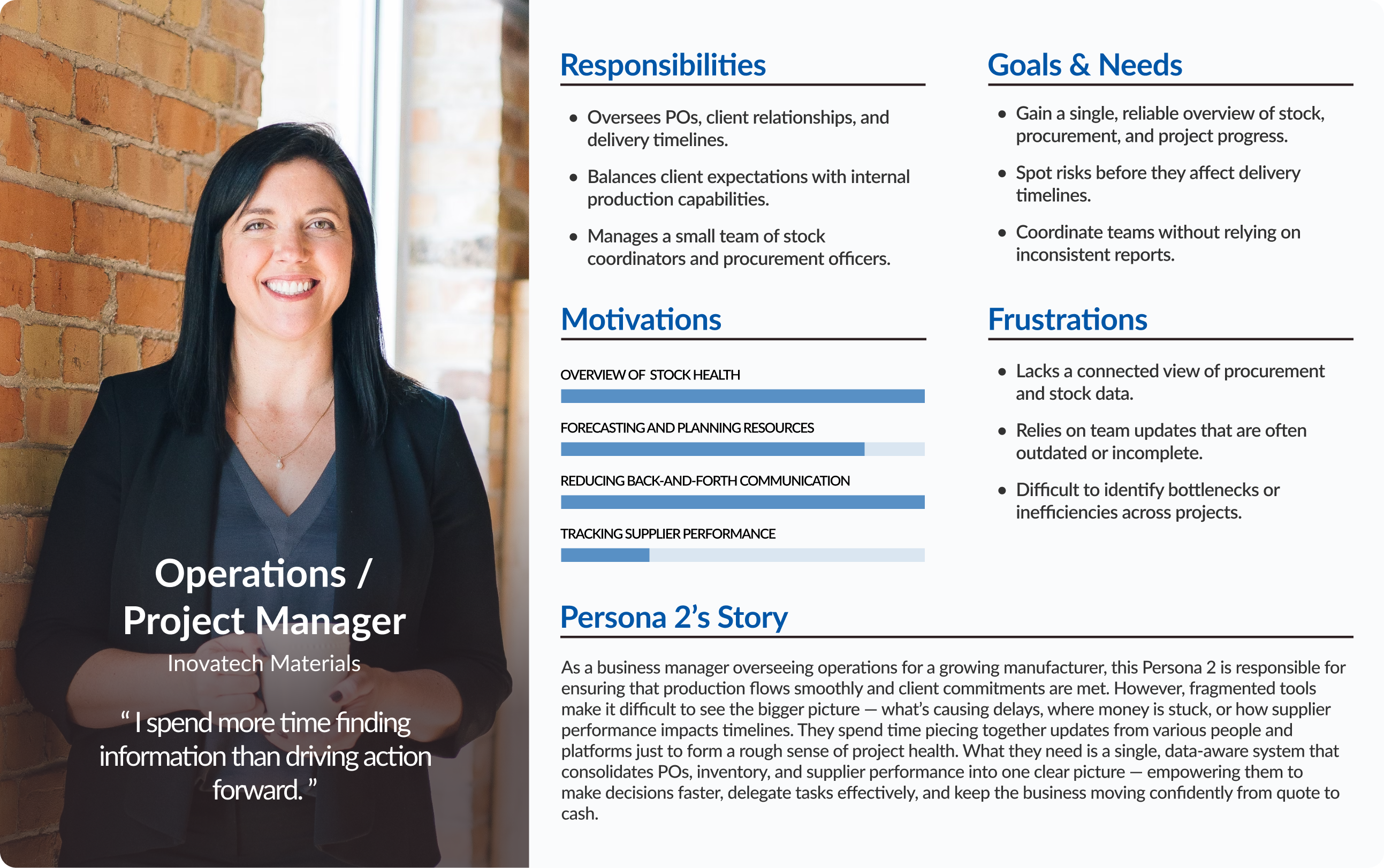
Building client profiles.
I created client personas put all relevant information about our clients needs, current frustrations and goals into a clear inforgraphic. I shared this across teams to ensure the user problem stayed visible throughout the development process.
User Data & Insights
How our clients are currently tackling their operations.
Through client interviews and analytics, we uncovered major inefficiencies in how teams manage their operations:
8/8
managers
Use separate platforms to store product data and manage their invoices and POs.
8/8
managers
Manage stock and procurement through multiple systems.
8/8
managers
Described the process as strenuous, error-prone, and difficult to keep consistent across teams.
Key takeaway:
It became clear our clients needed a unified system — one already aware of their existing product data — to seamlessly handle stock, procurement, and resource planning. With this data already in Worldover, we knew our platform was the perfect place to make it happen.
Solution Ideating
User Flows
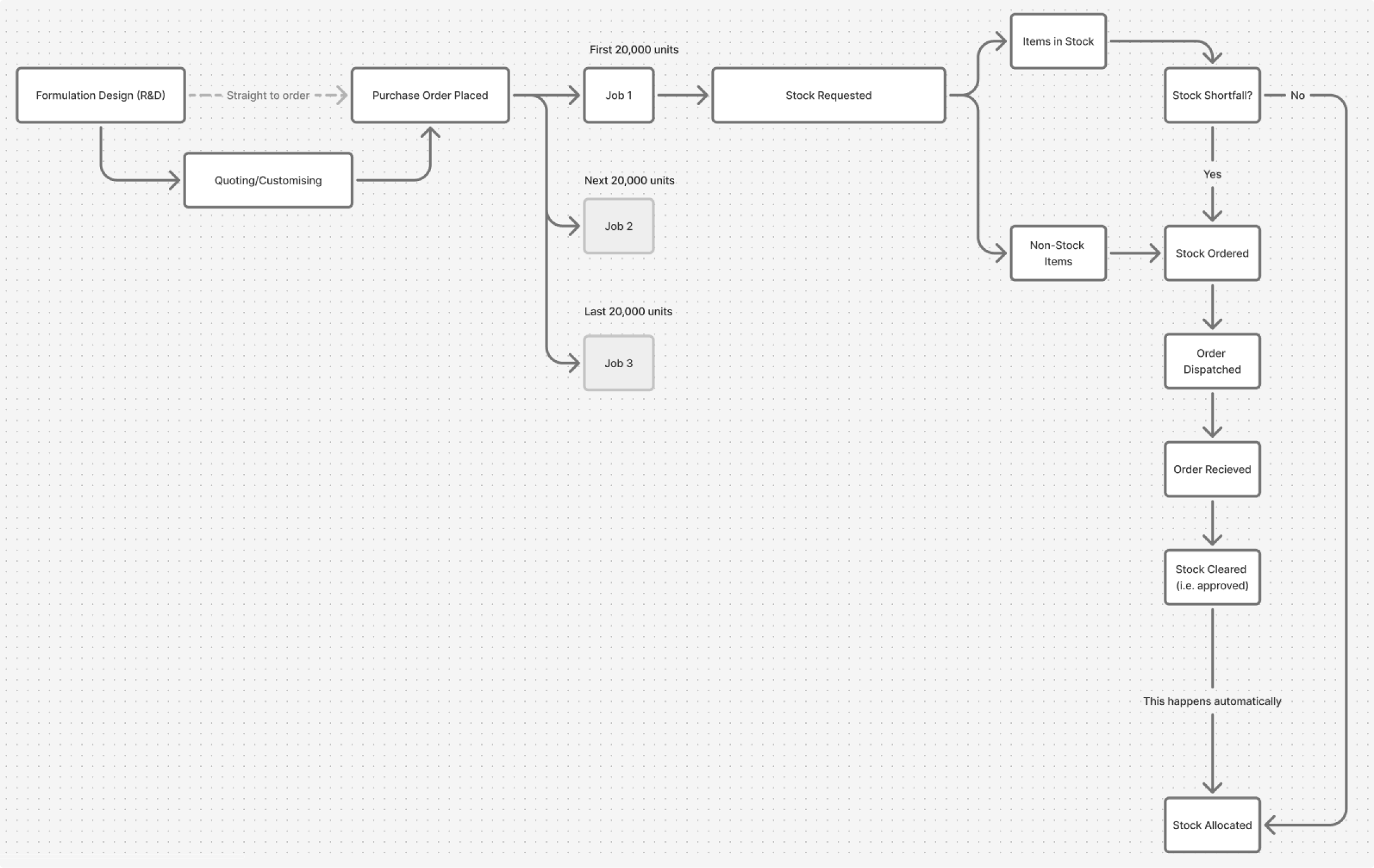
Building on our foundational user research and my personas, I designed different user flows that reflect the user journeys of how project managers think and act.
For example: reviewing items in a PO → checking what’s in stock for relevant materials → identifying stock shortfalls for the order → making stock requests.
Solution Ideating
High-Fidelity Prototyping
The next phase focused on translating concepts into high-fidelity prototypes. Yes, straight to high-fidelity.At our fast-paced start-up, frequent client calls are integral to validating direction and gathering detailed feedback on my designs. I noticed early on that we had limited time for usability testing with out clients. Our clients responded best to walkthroughs of high-fidelity screens and interactive prototypes that reflected the real experience of using our tools. Given their pace of work, high-fidelity A/B testing and interactive prototypes made it easier for them to provide focused, actionable feedback.
I quickly adapted my design process to match their pace — rapidly building hi-fi wireframes and prototypes while refining the Worldover design system to better support fast interaction design and real-time iteration during client calls.
I talk more about adjusting to this design process change in this project's Reflections.
Design Justifications
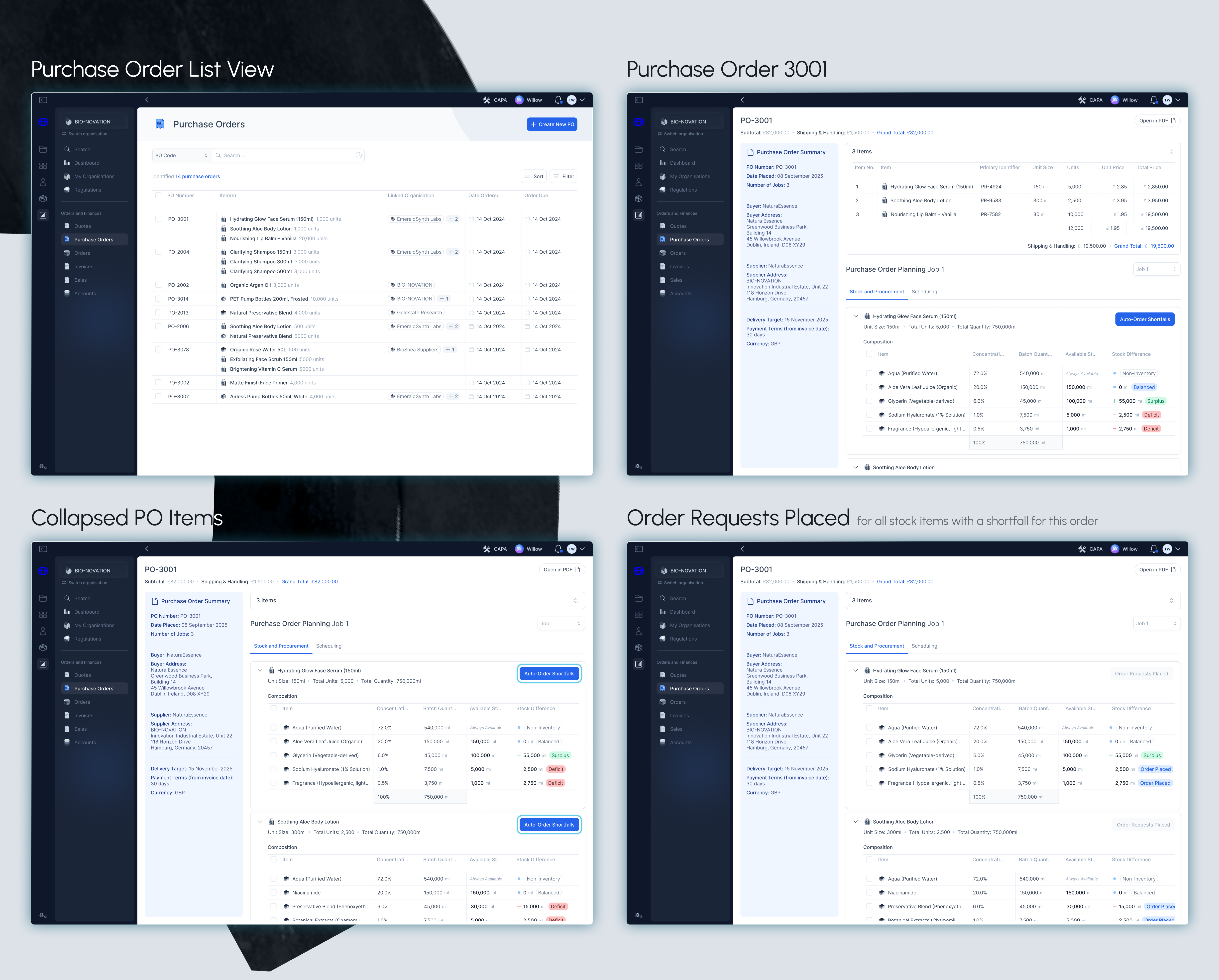
Button to auto-request orders for stock shortfalls.
After more usability studies, I uncovered behavioural pain-points when observing user's behaviours when checking for stock shortfalls for a purchase order.
6 out of 8 stock managers (75%) manually clicked on each stock item with a shortfall to place an order request.
In the MVP I used for my usability study, I only portrayed a few stock items that had a shortfall or were out of stock. However, they also mentioned that at times there could be dozens of stock items that are out of stock for an order, warning that this process could be frustratingly repetitive. Responding to this research and feedback, I designed a clear, high-contrast button at the top of each PO item summary, making the process of making order requests significantly faster and easier.
Design Justifications
Advanced stock views, for our power users.
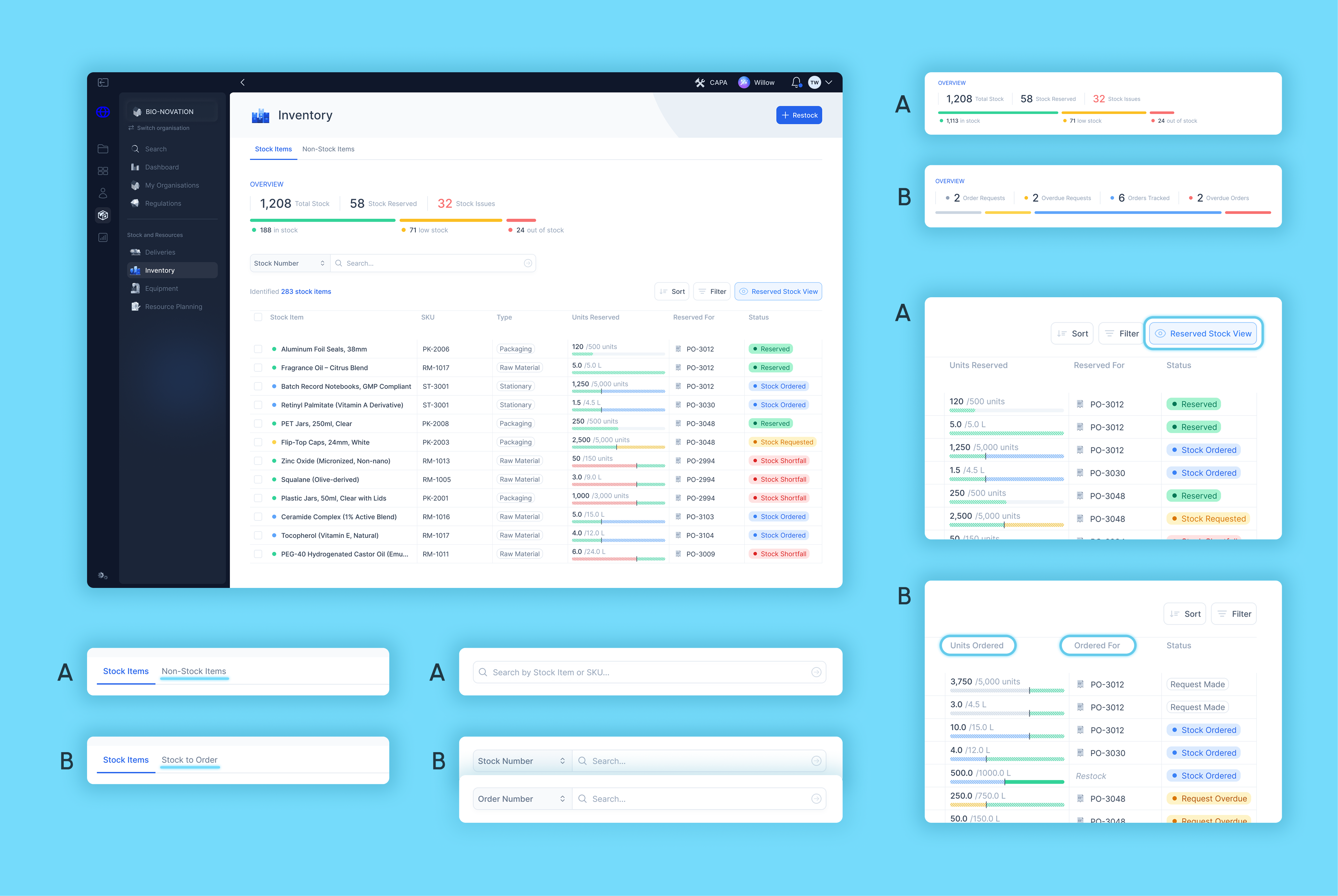
The most important column on this table was the Stock column, which took a lot of scrutiny to get to the final design we have today. After conducting usability studies with my prototype with clients and posing and behavioural questions, I gained a deeper understanding our clients' needs.
  • 9 out of 16 managers (56%) had trouble finding where to find which stock has been ordered for a specific purchase order.
  • 8 out of 16 managers (50%) clicked the stock item to try and locate information about ordered stock.
  • 6 out of 16 managers (37%) commented that they would prefer to immediately see on a dashboard which stock items have been reserved, and which stock items already have an order coming in.
This data showed that almost half of our users thought it wasn't immediately clear where to locate more detailed information about stock from the current dashboard design. Some managers thought that a more detailed dashboard that shows reserved and ordered items was necessary, though not an overwhelming majority.
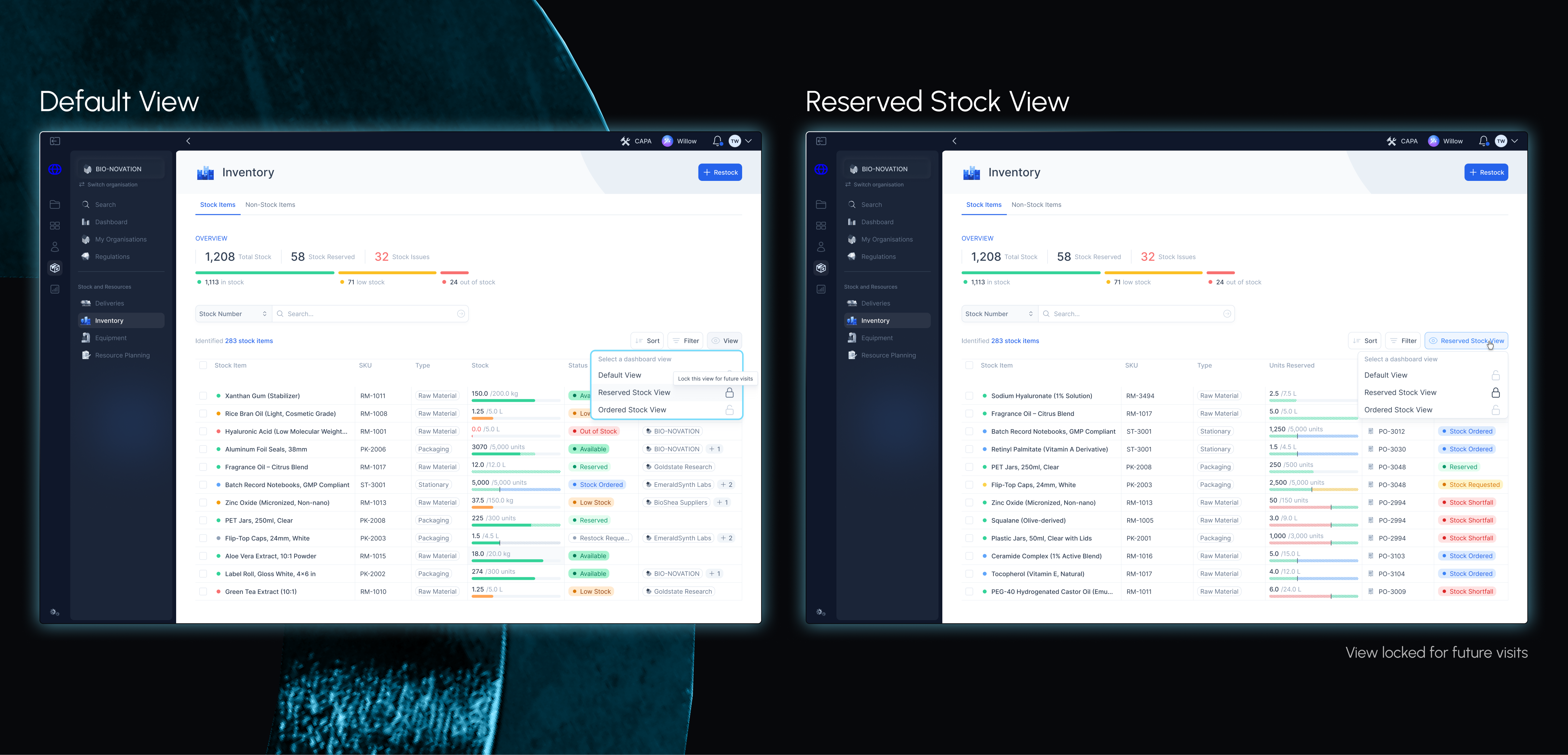
As a result, I introduced dashboard "Views" that enables users picking different views of our inventory dashboard. The "Reserved Stock View" provides more detailed on reserved, ordered and stock requests.
Next Steps
So... what’s next?
Summary key design changes based on design research insights:
Ongoing iteration and refinement
Continuing to collaborate with our engineers
In-platform resource planning
Supplier management
Mid-Project Review
Impact already made.
Though we’re still early in the rollout, results are already taking shape.
28%
Increase in active users
... using the newest launch of our inventory tool after implementing the advanced stock view.
6
Prospective companies
... actively expressing interest in our Inventory and Purchase Order tools.
4
Of our clients
... upgrading to our enterprise tier, and anticipating the launch of our upcoming supplier management features.
Mid-Project Review
Reflections and lessons learned.
Flash designing in a start-up! ⚡
The smaller picture can also be perfectly acceptable to launch
Thanks for reading!
You might also like
Willow, A Conversational AI-powered Assistant
Worldover
Desktop Platform
April 2025 - August 2025
Read the story
3 minute read
Skate Lesson Booking Feature
Vibes on Vibes
Web and Native App
December 2023 - August 2024
Read the story
8 minute read
Living Off-Campus Website Design
University of Warwick
Web
October 2023 - September 2024
Read the story
8 minute read
International Student Support Website Redesign
University of Warwick
Web
July 2023 - October 2023
Read the story
8 minute read